Silent Tug Syndrome: Diagnosing and Resolving AI Pushback Failures in Flight Simulation
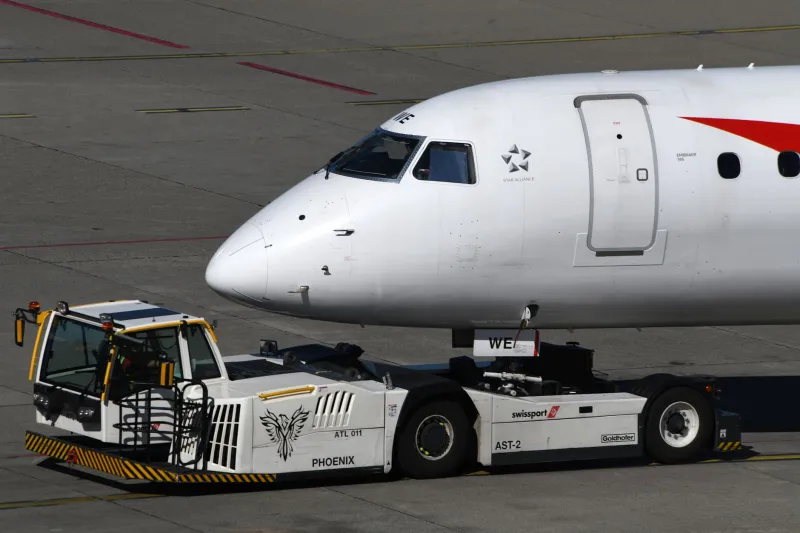
There is perhaps no more frustrating moment in gate simulation than requesting a pushback, watching the ground crew acknowledge your call, and then witnessing absolutely nothing happen. The tug sits motionless. The aircraft remains pinned to the gate. Your departure clock ticks forward. For simmers who have invested considerable effort into building a high-fidelity airport operations workflow, a non-responsive pushback AI is not merely an inconvenience — it is a fundamental breakdown in the chain of ground operations that defines realistic ramp procedures.
At VDG SimDock, we refer to this condition informally as Silent Tug Syndrome. It is one of the most commonly reported issues in the North American flight simulation community, and it is also one of the least systematically addressed. Most forum threads devolve into a list of suggested fixes with no underlying logic connecting them. This guide takes a different approach: a structured, layered diagnostic process that identifies root causes before prescribing solutions.
Understanding the Communication Chain
Before diagnosing a failure, it is essential to understand what a successful pushback sequence actually requires. When you issue a pushback command — whether through an in-sim menu, a dedicated pushback add-on, or an aircraft-specific ground services panel — that command must travel through several distinct layers of simulation logic.
First, the aircraft's ground state must be correctly recognized by the simulator. The sim needs to confirm that your aircraft is stationary, that parking brakes are engaged or properly managed, and that no conflicting ground state flags are active. Second, the ground service AI must receive and interpret the command. Third, the tug model must be spawned or activated at the correct nose gear position. Finally, the tug's movement logic must execute without being interrupted by conflicting add-on processes.
A failure at any one of these layers produces the same outward symptom: nothing moves. Identifying which layer has failed is the entire diagnostic challenge.
Layer One — Aircraft Ground State Verification
Begin your diagnosis at the aircraft itself. Many pushback failures originate not in the ground AI but in an incorrect aircraft ground state that prevents the AI from receiving a valid trigger.
Check your parking brake status first. Counterintuitively, certain aircraft add-ons — particularly those with custom hydraulic simulation — require the parking brake to be fully released before a pushback command is processed, while others require it to be set. Consult your aircraft's documentation and confirm which behavior is expected. A mismatched brake state is among the most common single-point failures in this category.
Next, verify that your aircraft's weight-on-wheels (WOW) sensors are registering correctly. Some complex aircraft models use WOW logic to gate ground service availability. If a WOW sensor is falsely reading an airborne state — a known bug in several popular payware aircraft following simulator updates — the ground AI will never receive a valid pushback trigger. Reloading the aircraft state or repositioning via the sim's slew function often resolves this.
Finally, confirm that your engines are fully shut down if your chosen pushback workflow requires it. Several ground handling scripts will refuse to initiate a tug spawn while any engine is running, treating an active powerplant as a safety interlock.
Layer Two — Add-On Conflict Mapping
If the aircraft ground state checks out, the next layer to examine is your add-on stack. The North American simmer community has adopted a wide variety of ground handling tools, and these tools do not always coexist gracefully.
Three categories of add-ons are most frequently implicated in pushback failures:
Dedicated pushback utilities such as GSX Pro (by FSDT), TugMaster, and similar tools each use proprietary methods to spawn and animate ground equipment. When two such utilities are active simultaneously — a situation that occurs more often than expected, particularly when aircraft-specific handling scripts are bundled with payware jets — they can issue conflicting commands to the simulator's ground vehicle system, resulting in a deadlock where neither tool successfully completes a tug spawn.
AI traffic managers represent a second major conflict category. Tools that populate airports with AI aircraft, including AIG Traffic Controller and FSLTL, maintain their own ground vehicle logic to service their AI fleets. On high-density ramps at airports like Chicago O'Hare or Atlanta Hartsfield-Jackson, these systems can exhaust the simulator's ground vehicle spawn budget, leaving no resources available for your own pushback request.
Scenery add-ons with embedded ground logic constitute the third category. Several premium US airport sceneries — particularly those developed before current simulator versions — include legacy ground service scripts that activate automatically and interfere with modern pushback utilities. If your pushback failures are location-specific, this is the first hypothesis to test.
A Systematic Diagnostic Flowchart
Apply the following sequence when Silent Tug Syndrome occurs:
- Confirm aircraft ground state. Verify parking brake configuration, WOW sensor status, and engine state against your aircraft's documentation.
- Disable secondary pushback tools. If you have more than one ground handling utility active, disable all but your primary tool and attempt the pushback again.
- Test at a default airport. If the pushback succeeds at a default scenery location, the failure is scenery-specific. Investigate the add-on airport for embedded ground scripts.
- Reduce AI traffic density. Lower your AI traffic slider or temporarily disable your traffic manager and retry. If this resolves the issue, your ground vehicle spawn budget is being consumed by AI fleet servicing.
- Check simulator event logs. Both Microsoft Flight Simulator and X-Plane maintain accessible log files that record failed service requests. Search for entries referencing pushback, tug, or ground vehicle errors at the timestamp of your failure.
- Reinstall your primary pushback tool. If all prior steps fail, a corrupted installation of your ground handling utility is likely. A clean reinstall resolves a significant proportion of persistent cases.
Add-Ons with Known Vulnerability Profiles
Based on community-reported issues and our own testing at VDG SimDock, several widely used add-ons carry elevated conflict risk:
GSX Pro, while among the most capable ground handling suites available, is particularly sensitive to aircraft-bundled pushback scripts. Fenix Simulations' A320 and PMDG's 737 series both include proprietary ground handling logic that must be explicitly disabled within GSX Pro's configuration panel to prevent command conflicts.
X-Plane users employing the BetterPushback plugin alongside custom aircraft with XPRealistic or similar immersion add-ons have reported intermittent tug freeze events, typically caused by XPRealistic's camera shake routines interrupting BetterPushback's movement callbacks during initial tug attachment.
Several Aerosoft airport sceneries for US hubs include legacy SODE-based jetway and vehicle scripts that conflict with GSX Pro's vehicle spawning system at specific gate positions. The issue is gate-specific and can be isolated by testing pushback at multiple gates within the same airport.
Restoring Control of Your Ground Operations
Silent Tug Syndrome is not an inevitable cost of complex simulation. It is a solvable problem — one that yields to patient, methodical diagnosis. The key discipline is resisting the impulse to apply random fixes from forum threads and instead working through the communication chain from aircraft state outward to add-on interaction.
At the gate, precision matters. That principle applies as much to the diagnostic process as it does to the final approach. When you understand why your tug driver is ignoring you, the path to a clean, realistic pushback becomes considerably shorter.