After Dark at the Stand: Auditing Night Docking Cues Before the Wands Come Up
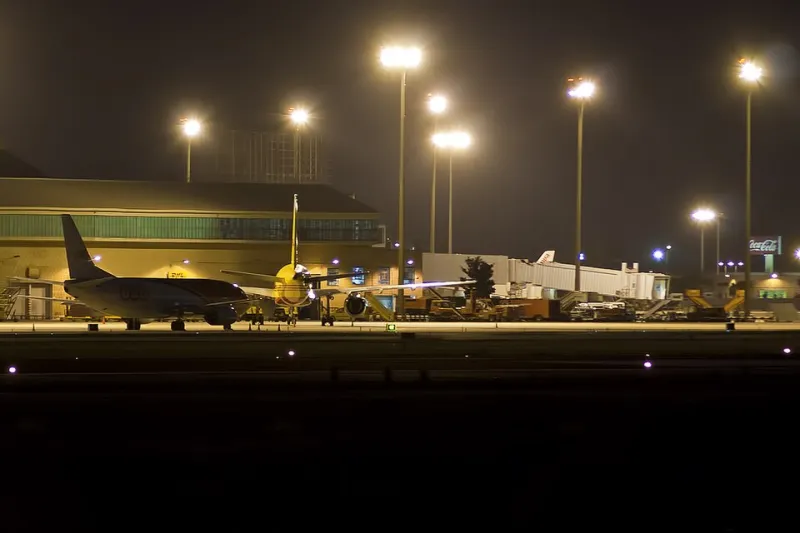
Photo: Curimedia, CC BY 2.0, via Wikimedia Commons
Night operations at a major US hub do not simply dim the daytime stand-entry problem. They replace its reference system. At 2 a.m., a lead-in line that reads clearly in a midday screenshot may dissolve into the ramp surface, while a marshaller's wands become the only moving cue with enough contrast to trust. For simmers who practice gate work, that shift deserves a deliberate audit rather than a casual night flight.
Why Night Changes the Stand-Entry Problem
Apron lighting is not designed to flatter aircraft models. It is designed to illuminate work areas, discourage unauthorized movement, and keep traffic flowing. The result is a patchwork of pools, shadows, and glare zones. A lead-in line may pass under a floodlight, then disappear across dark concrete, then reappear near the stop point. Paint that looks bright in daylight can lose contrast against wet or stained pavement. Retroreflective materials help in the real world, but simulation scenery often approximates them with flat textures that do not respond to viewing angle or light source.
That matters because stand entry is a low-tolerance task. The aircraft must track the line, respect the stop point, and keep wingtips and tail clear of fixed objects. At night, the pilot's scan is narrower. Bright apron lights can wash out the very markings they are meant to reveal. A marshaller's wands, by contrast, are deliberately motion-based and high-contrast. They are not decoration; they are a redundant guidance system.
The Real Hierarchy of Cues After Sunset
In daylight, a pilot and ground crew can use a broad set of references: the lead-in line, the stop bar, the building edge, the jetbridge, nearby equipment, and the marshaller's position. At night, the hierarchy changes. The wands ascend in importance. The lead-in line remains essential, but it is read in shorter segments. The stop point becomes a remembered position as much as a visible mark. Apron glare can hide a chock, a tow bar, or a piece of ground equipment until it is dangerously close.
US hubs illustrate the variation. At Atlanta Hartsfield-Jackson, the sheer density of lighting and activity creates a busy visual field. At Dallas/Fort Worth, long sightlines and widely spaced stands can leave a crew working with fewer nearby references. At Chicago O'Hare, terminal geometry and winter grime can alter how paint reads after dark. A simmer who practices only at one airport is practicing one lighting environment, not night docking as a category.
Glare Zones and the Stop Point You Cannot See
Glare is the quiet failure mode. A floodlight behind the stand can turn a stop bar into a blank patch. A light pole ahead of the aircraft can produce a starburst effect in some simulators, especially when bloom or lens flare settings are aggressive. Add a wet apron texture, and the lead-in line may reflect light in a way that looks plausible but destroys the visual edge you need.
The stop point is especially vulnerable. In the real world, ground crews and pilots rely on multiple cues: the marking itself, the marshaller's signal, the jetbridge position, and the known stand geometry. In simulation, a single missing texture or an overly dark material can remove one of those cues without warning. The result is not a dramatic crash. It is a slow, uncertain creep past the correct position, followed by a jetbridge that cannot reach the door or a wingtip that stops short of a clearance limit by inches.
A Simulator Audit for Low-Light Docking
A useful audit begins before the aircraft moves. Load the stand at night with the same weather and time settings you intend to use. Then inspect the scene as an operations problem, not a screenshot.
- Check the lead-in line from the pilot's eye position, not the external camera. Does it remain readable in segments, or does it vanish entirely between lights?
- Identify every stop point cue. Is there a stop bar, a marshaller position, a jetbridge reference, or a building edge? If only one cue exists, treat the stand as degraded.
- Inspect apron lighting for glare. Move the view slightly left and right. If the stop point disappears from one angle, the scenery is not giving you a stable reference.
- Compare daytime and nighttime paint contrast. A line that is crisp at noon but muddy at midnight may indicate a texture or material issue.
- Test aircraft lighting. Taxi lights, landing lights, and logo lights can help or hurt. Use them as they would be used during stand entry, not as a general brightness boost.
- Review simulator display settings. Bloom, exposure, and anti-aliasing can change how thin markings read. A setting that looks cinematic may be operationally poor.
Rehearsing the 2 A.M. Stand
The goal is not to make night docking look dramatic. It is to make it predictable. Practice the same stand at dusk, midnight, and pre-dawn. Practice with the marshaller visible and with the marshaller positioned where the wands are the dominant cue. Practice stopping on the mark when the lead-in line is partially obscured. That is the skill night operations demand.
VDG SimDock treats the stand as a system of cues, not a single painted line. Night docking exposes which of those cues are real and which are merely assumed. Auditing them after dark is one of the most practical ways to prepare for the 2 a.m. arrival that never appears in a daytime tutorial.